IntersectionObserver
CAUTION
检测元素是否进入视口,常用于实现懒加载。
ts
var observer = new IntersectionObserver(callback[, options]);常用配置项
root:监听元素的祖先元素,默认是视口。rootMargin:距离边界的偏移量,与 margin 类似,默认值为0px 0px 0px 0px。threshold:交叉区域的比例0.0 - 1.0的数字,默认是0.0表示监听元素与根元素有 1px 交叉,1.0表示监听元素与根元素完全交叉。
回调函数
ts
function callback(entries, observer) {
  entries.forEach(entry => {
    if (entry.isIntersecting) {
      // 元素进入视口
    } else {
      // 元素退出视口
    }
  });
}
常用实例的方法
observer.observe(target):开始观察目标元素。observer.unobserve(target):停止观察目标元素。如果没有,不做任何操作observer.disconnect():断开所有目标元素的观察。
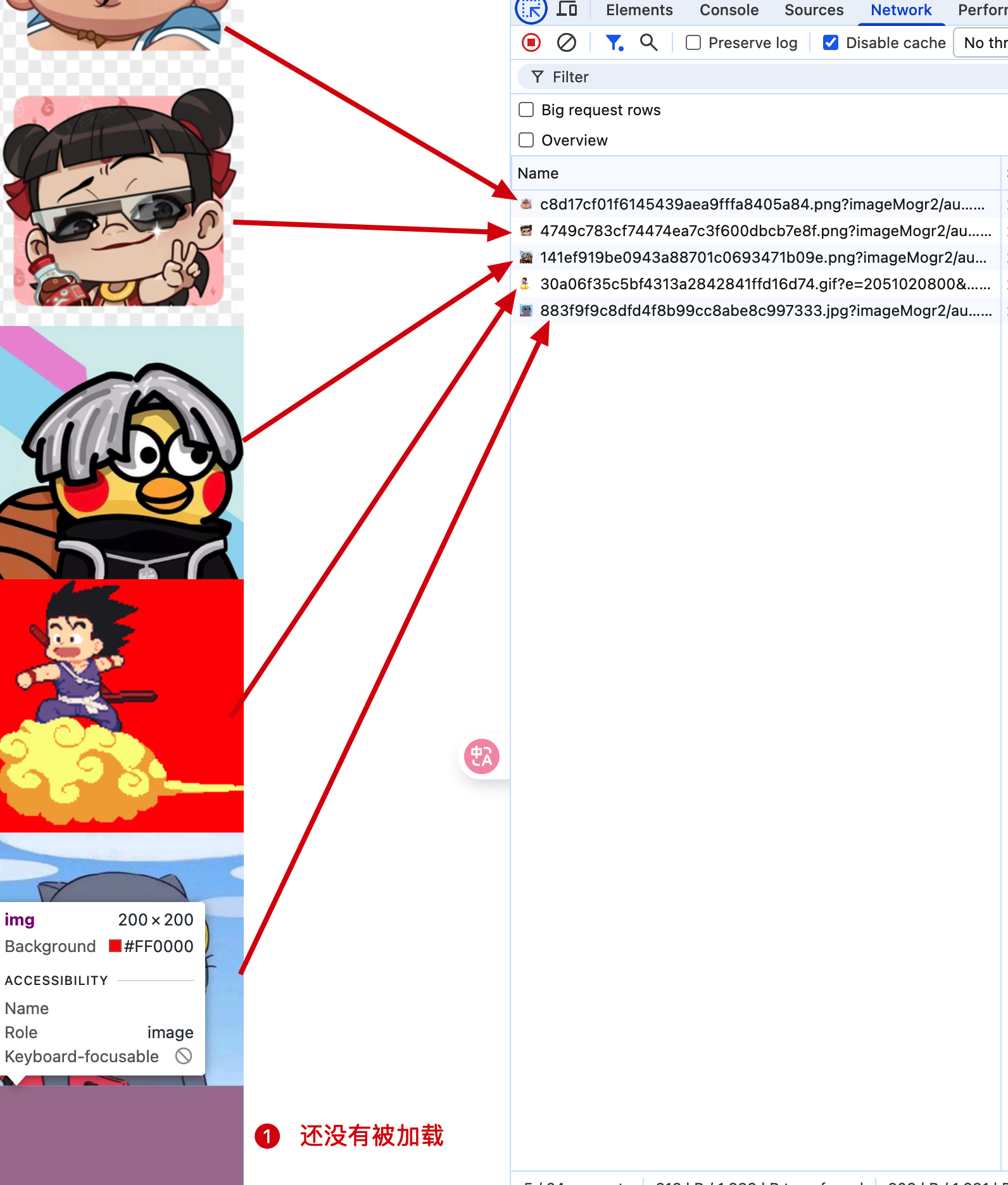
被监听的元素可以是一个,也可以是多个。以图片懒加载为例,当图片进入视口时,加载图片。
tsx
const App = () => {
  const imageUrls = [
    'https://picsum.photos/200/300',
    // ...
  ];

  const imagesRef = useRef<HTMLImageElement[]>([]);
  const observerRef = useRef<IntersectionObserver>();

  useEffect(() => {
    observerRef.current = new IntersectionObserver((entries) => {
      entries.forEach(entry => {
        if (entry.isIntersecting) {
          const image = entry.target as HTMLImageElement;
          image.src = image.dataset.src || '';
          // 完成后移除监听
          observerRef.current?.unobserve(image);
        }
      });
    }, { threshold: 0.5 });

    imagesRef.current.forEach(image => {
      observerRef.current?.observe(image);
    });
    return () => observerRef.current?.disconnect();
  }, []);

  return (
    <>
      <div style={{ height: '1000px' }}></div>
      <div style={{ display: 'flex', flexDirection: 'column' }}>
         {imageUrls.map((url, index) => (
          <img
            ref={(el) => { imageRefs.current[index] = el }}
            key={index}
            data-origin={url}
            // 图片的默认高度是 0 堆叠在一起, 要设置高度
            // 不然一旦进入视口直接全部触发交叉逻辑
            style={{ width: '200px', minHeight: '200px', backgroundColor: 'red' }} />
          ))}
      </div>
    </>
  )
}
MutationObserver
CAUTION
监听 DOM 树的变化,常用于实现响应式的 UI。
ts
var observer = new MutationObserver(callback);回调函数
ts
function callback(mutationsList, observer) {
  mutationsList.forEach(mutation => {
    if (mutation.type === 'childList') {
      // 子元素变化
    } else if (mutation.type === 'attributes') {
      // 属性变化
    }
  });
}
实例方法
observer.observe(target[, options]):开始观察目标元素。observer.takeRecords():取出所有变化记录,返回一个数组。observer.disconnect():断开所有目标元素的观察。
常用配置项
childList:监听子元素的变化,默认是false。attributes:监听属性的变化,默认是false。attributeFilter:监听指定属性的变化,默认是null,比如['class', 'style']则是监听class和style属性的变化。subtree:监听后代元素的变化,默认是false。
同样支持单个或者多个目标元素的观察。
tsx
const App = () => {
  const ref = useRef<HTMLDivElement>(null);
  useEffect(() => {
    const mutate = new MutationObserver((mutations) => {
      mutations.forEach((mutation) => {
        console.log(mutation.type);
      });
    })
    mutate.observe(ref.current!, { attributes: true, childList: true });
    return () => mutate.disconnect();
  }, [])
  return (
    <>
      <div ref={ref} style={{ width: '200px', minHeight: '200px', backgroundColor: 'red' }}></div>
      <button onClick={() => ref.current?.style.setProperty('background-color', 'blue')}>修改样式</button>
      <button onClick={() => ref.current?.appendChild(document.createElement('div'))}>修改子元素</button>
    </>
  )
}
ResizeObserver
CAUTION
监听元素大小的变化,常用于实现响应式的 UI。
ts
var observer = new ResizeObserver(callback);回调函数
ts
function callback(entries, observer) {
  entries.forEach(entry => {
  });
}
实例方法
observer.observe(target, options):开始观察目标元素。observer.unobserve(target):停止观察目标元素。observer.disconnect():断开所有目标元素的观察。
常用配置项
box:监听元素的边框盒大小,默认是content-box。还有border-box和device-pixel-content-box。与布局的 box-sizing 相关。
tsx
const App = () => {
  const ref = useRef<HTMLDivElement>(null);
  const [width, setWidth] = useState(200);
  const [borderWidth, setBorderWidth] = useState(1);
  const [padding, setPadding] = useState(10);

  useEffect(() => {
    const resizeObserver = new ResizeObserver((entries) => {
      entries.forEach((entry) => {
        console.log(entry.contentRect);
      })
    })
    resizeObserver.observe(ref.current!, { box: 'content-box' });
    return () => resizeObserver.disconnect();
  }, [])
  return (
    <>
      <div
        ref={ref}
        style={{
          width: `${width}px`,
          minHeight: '200px',
          border: `${borderWidth}px solid red`,
          padding: `${padding}px`
      }}></div>
      <button onClick={() => setWidth(() => width + 10)}>修改宽度</button>
      <button onClick={() => setBorderWidth(() => borderWidth + 1)}>修改边框宽度</button>
      <button onClick={() => setPadding(() => padding + 1)}>修改内边距</button>
    </>
  )
}
PerformanceObserver
CAUTION
监听性能指标的变化,常用于性能优化,性能监控。
ts
var observer = new PerformanceObserver(callback);回调函数
ts
function callback(list, observer) {
  var entries = list.getEntries();
  entries.forEach(entry => {
    console.log(entry);
  });
}
实例方法
observer.observe(options):开始观察性能指标。observer.disconnect():断开所有性能指标的观察。
常用配置项
entryTypes:监听的性能指标类型,默认是['resource']。还有['mark', 'measure']。分别对应 加载资源,自定义标记,自定义测量。
没实际用过,后续再补吧